








Exceed buyer expectations for a memorable service.
What it is
A native iOS and Android app where buyers manage viewings, submit offers, share feedback, and complete compliance checks. Everything syncs back to your CRM automatically, so your team spends less time on admin and more time closing.
Who benefits
Buyer. Manage viewings from your phone. Confirm, cancel, or arrange a second viewing without a phone call. Submit offers when it suits you, day or night.
Negotiator. Buyers confirm and cancel their own viewings, leave feedback after each one, and send offers in the app. Your team stops chasing updates and starts acting on them.
Sales Progressor. Once an offer is accepted, buyers complete AML, proof of funds, and solicitor details in-app. Everything lands in Street automatically, with your team keeping the final say on when compliance checks are activated.
Viewings, offers, and compliance. All in one app.
Video walkthrough coming soon

1 app
Viewings, offers, and compliance in one place.
Instant
Feedback after every completed viewing.
Free
Included with Street.co.uk, not a bolt-on.
Buying a home should feel exciting, not stressful. Emails get lost. Feedback calls come at awkward times. Vendors wait for news that never arrives. The Buyer App puts clients in control and frees your team to move deals forward.
Clients in control. Your team free to close.
Buyers manage viewings, submit feedback, and send offers from their phone. Compliance documents land in your CRM without a single email attachment.

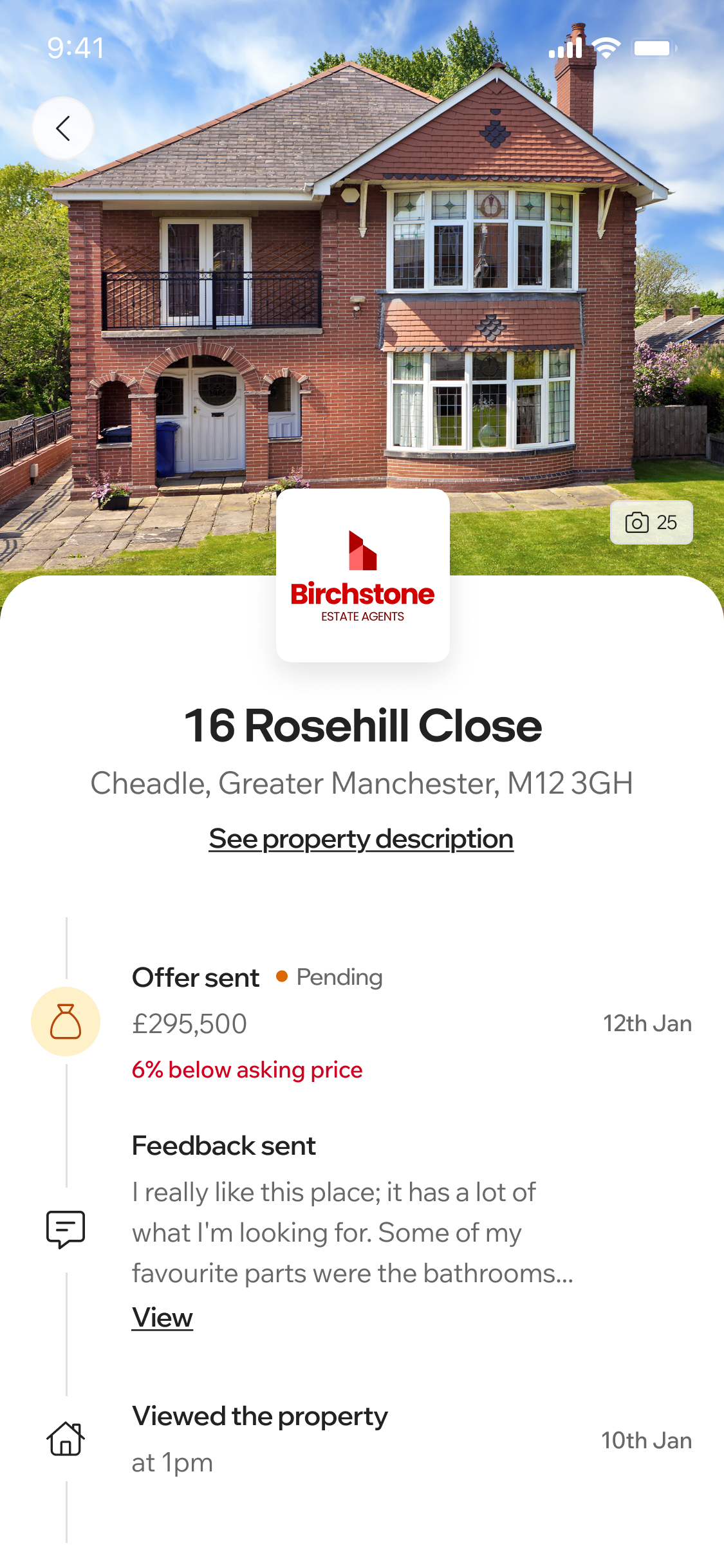
Viewings buyers can manage from their pocket.
Buyers see every upcoming viewing in one place, with the address, directions, and the option to add it to their calendar. If something changes, they confirm or cancel in-app and your team hears about it straight away. Second viewings can be arranged the same way, and feedback goes in after every completed appointment.
- Upcoming viewings: Address and directions for every appointment, with a one-tap option to add it to the buyer's calendar.
- Confirm or cancel: Changes come back to your team instantly, cutting down on no-shows and wasted journeys.
- Second viewings: Buyers arrange follow-ups directly in the app, without needing to phone in.
- Instant feedback: After each viewing, buyers submit feedback in-app, which feeds into your Listing Performance Reports and is summarised by AI for vendor conversations.
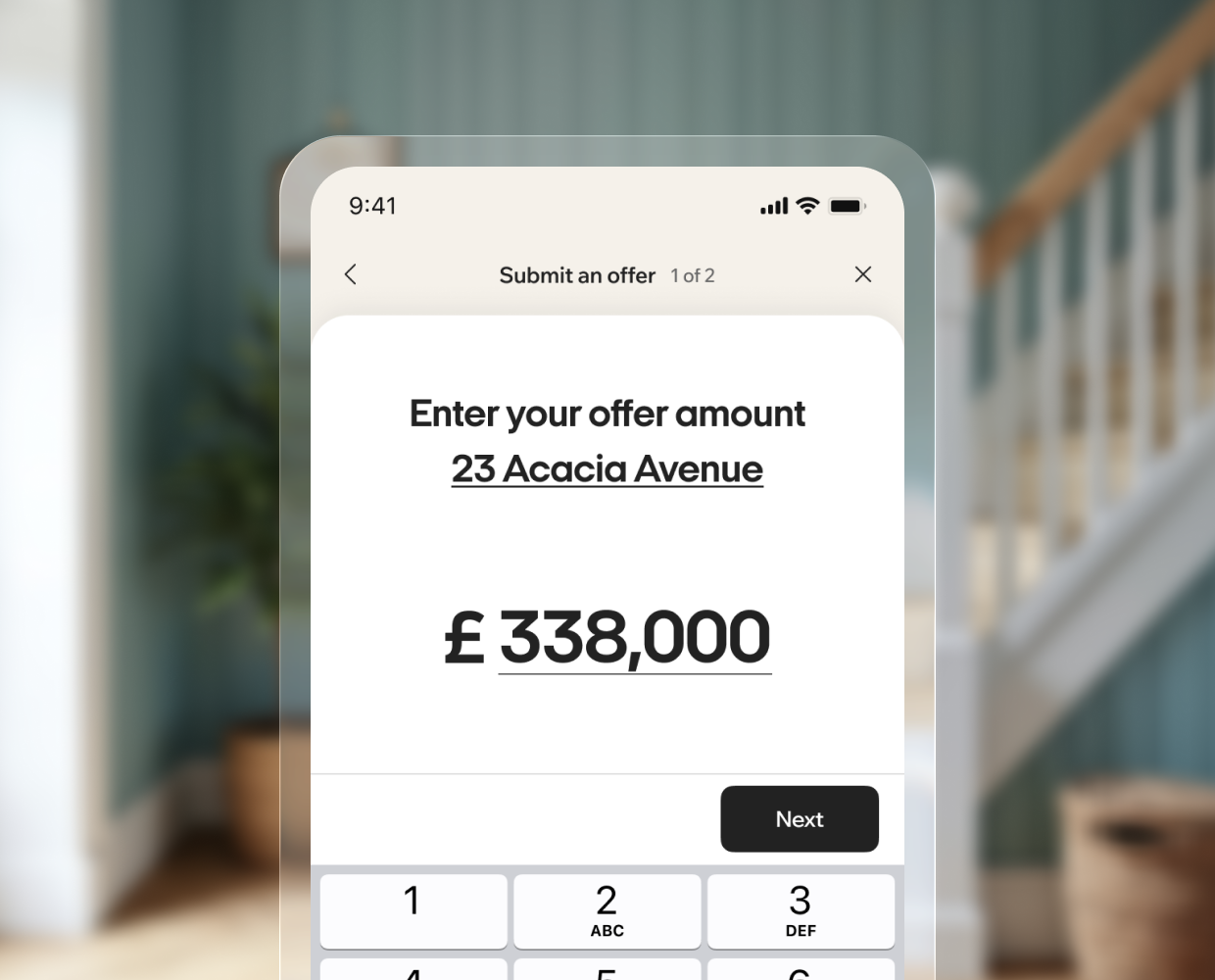
Offers, submitted around the clock.
Buyers can submit an offer straight after a viewing or once they've had time to reflect. It lands with the agent immediately, and the Offers tab shows the status of every offer that has been made. If one is rejected, the buyer can send a new one without picking up the phone.
- Round-the-clock offers: Clients submit offers whenever the moment feels right, not just during office hours.
- Offer status tracking: The Offers tab shows each submission and where it stands in Street.
- New offers if rejected: Buyers can respond and re-offer in a few taps.
- Direct to the agent: Every offer comes straight to your team, ready to action in the CRM.

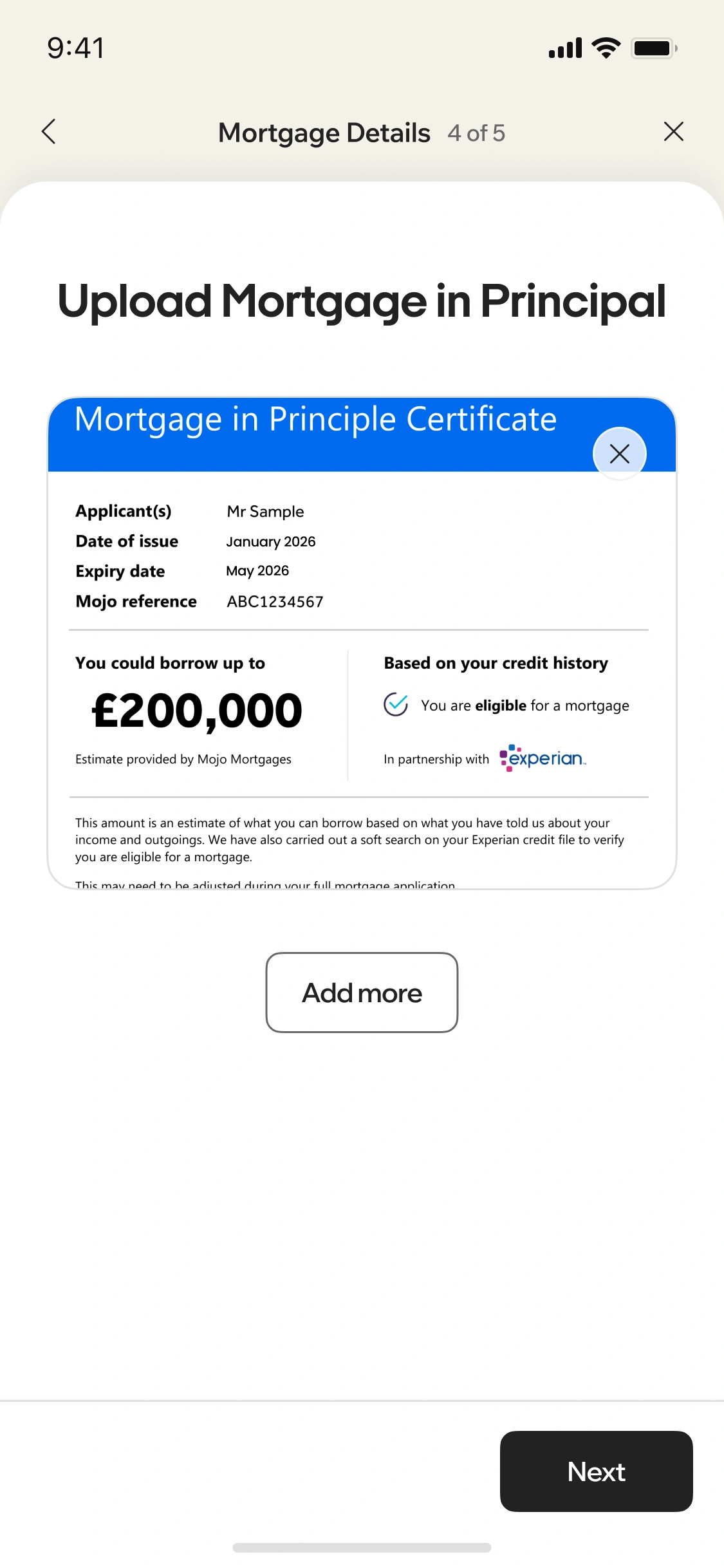
Compliance checks, without the chasing.
When an offer is accepted, or whenever your team decides to trigger it, buyers get an in-app prompt to complete the Buyer Ready workflow. They upload AML documents, proof of funds, and solicitor details, and everything syncs back to your CRM with a push notification as soon as it's done. Identification details stay on file, so the next time that buyer moves, you already have what you need. Your team keeps the final say on when each compliance check is activated.
- In-app prompts: Triggered automatically after an offer or manually by the agent.
- AML, proof of funds, and solicitor details: All uploaded through the same workflow, directly by the buyer.
- Kept on file: Buyer identification details are saved in Street for future instructions, so you never need to ask twice.
- Agent always in control: Your team has the final say on activating each compliance check.
"Our clients are busy, we're busy. If I need to send a viewing request, they can do it from their phone with their work diary in front of them. Or, if it's late at night when they've got confirmation from their partner if they're around, they can still easily confirm it or not, without needing to call."
Robert Fitzjohn, Fitzjohn Estates
Frequently asked questions
Buyers can manage their viewings (confirm, cancel, or arrange second viewings), submit property feedback after each viewing, make offers directly to the agent, and complete their compliance checks (AML, proof of funds, solicitor details) through the Buyer Ready workflow, all from one app.
Once an offer has been accepted, or when triggered by the agent, buyers receive an in-app prompt to upload their AML documents, proof of funds, and solicitor details. Everything lands in your CRM automatically, and the buyer's identification details are kept on file so you never need to ask for them again. The agent retains full control over whether to activate each compliance check.
Buyers can see all upcoming viewings in one place with address and directions, confirm or cancel appointments directly in the app, and add viewings to their calendar. If a viewing is cancelled, the agent is notified, so time isn't wasted on buyers who aren't going to turn up.
No. After every completed viewing, buyers are prompted to submit feedback directly in the app at their convenience. That feedback also feeds into Street.co.uk's Listing Performance Reports, automatically summarised by AI, giving you a useful tool for vendor conversations.
Yes. Buyers can submit offers at any time, whether straight after a viewing or once they've had time to reflect. The offer goes directly to the agent, and buyers can see the status of each offer in the app. If an offer is rejected, they're given the option to submit a new one.
No. The Buyer App is free as part of Street.co.uk. It sits alongside a full suite of consumer apps covering vendors, buyers, landlords, and tenants.
Yes. The Street.co.uk consumer app is available on both the iOS App Store and Google Play, built by Street's in-house mobile team.
No. Notes saved in the activity stream of a property in Street are internal to your agency only and will never appear in the consumer app.